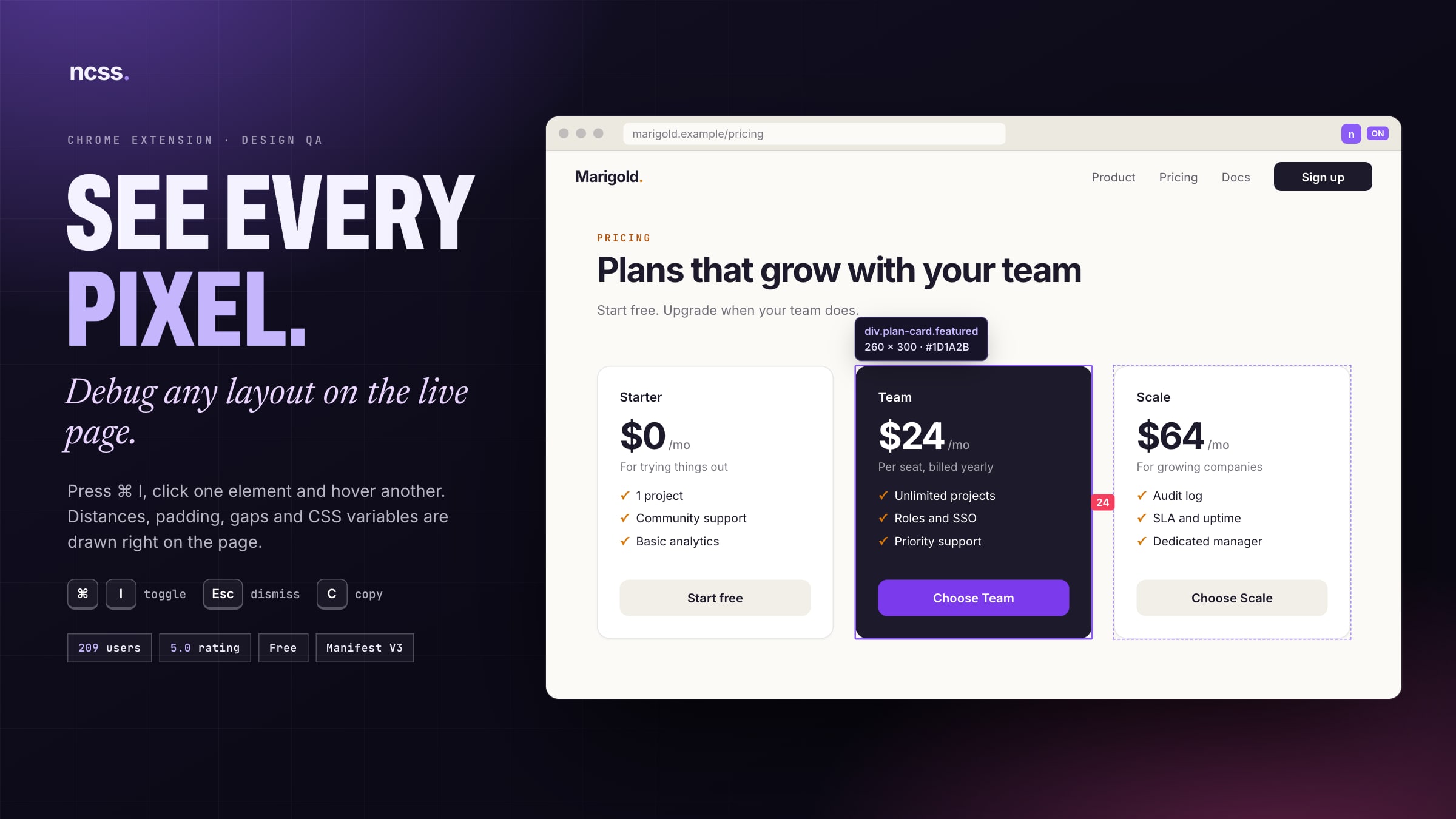
A Chrome extension that turns any live page into something you can measure and inspect, so designers and developers can audit layouts without opening DevTools.
A 4px padding, one DevTools panel at a time
Design QA means checking a live build against the Figma file. Is this gap 24 or 20? Is this the brand purple, or a hex someone pasted? Chrome DevTools answers one element at a time, in a side panel, in computed values.
Nothing showed the relationship between two elements, which is what a designer actually asks about, and nothing said which design token a colour came from.
Answer design questions on the page itself
I wanted a tool a designer could use without ever opening DevTools, and wrote down what it had to do.
- Goal 1Measure the distance between any two elements with one click and one hover.
- Goal 2Show which design token a value comes from, not just the resolved number.
- Goal 3Never break, slow down or watch the page it inspects.
Distance is a relationship, not a property
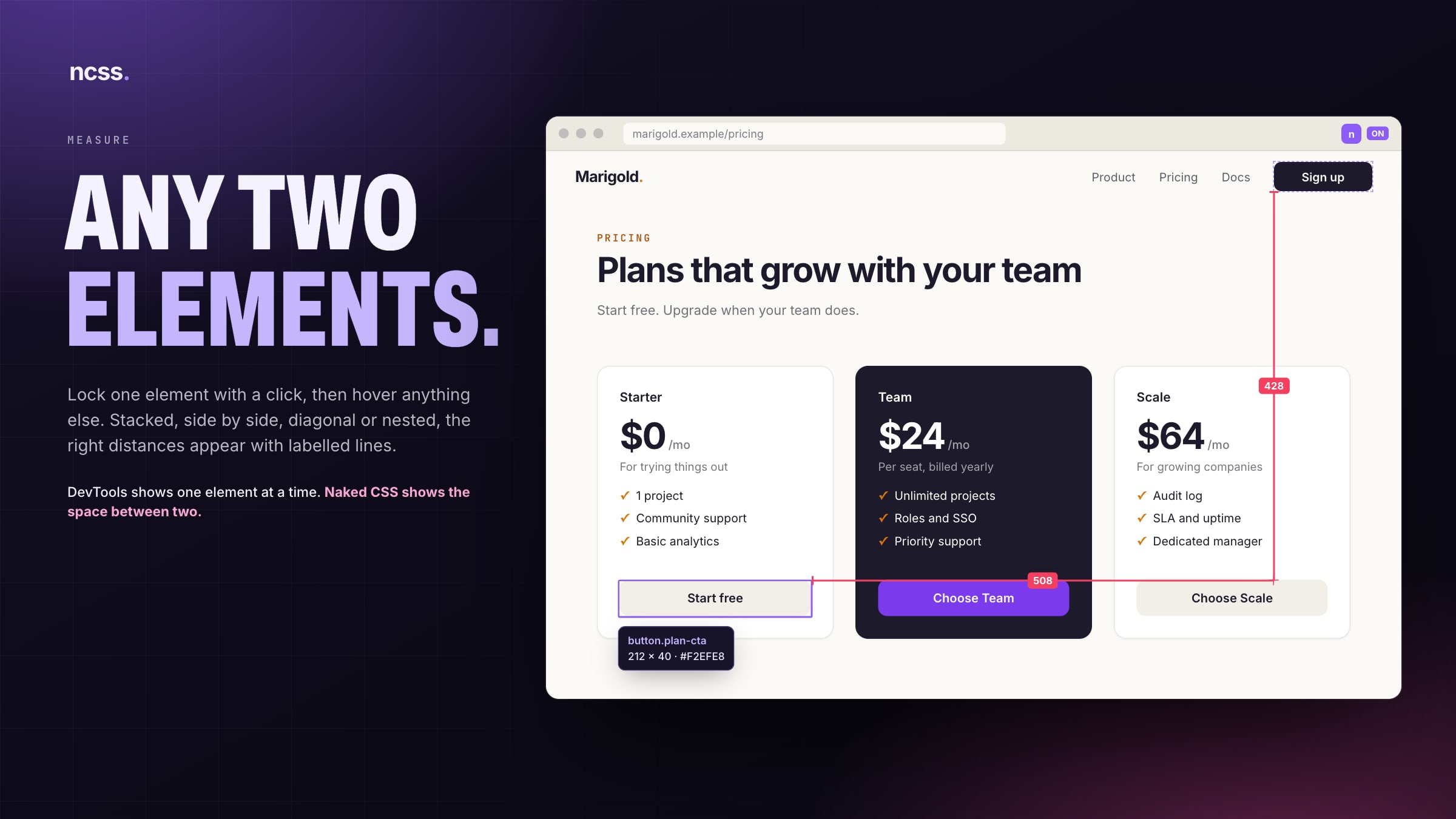
Click to lock one element, hover another, and the extension classifies the pair: stacked, side by side, diagonal or nested. Each case draws something different, from a single labelled gap to an L of two distances with dashed guides.
Measurements start from what the eye sees. When a child sits flush against its parent’s border, its box is pushed out to that border edge, so the number matches the designer’s ruler instead of the inside of a border.
Trade‑offTwo elements at a time, by design. Multi‑select would have made every overlay harder to read.
See the codecontent-script/geometry · computeMeasurement
Two overlap tests decide which of four measurement cases a pair falls into.
export function computeMeasurement(a: ElementRect, b: ElementRect): MeasurementResult {
  const xOverlap = a.left < b.right && b.left < a.right;
  const yOverlap = a.top < b.bottom && b.top < a.bottom;

  if (xOverlap && yOverlap) return computeOverlapping(a, b);
  if (xOverlap && !yOverlap) return computeVertical(a, b);
  if (!xOverlap && yOverlap) return computeHorizontal(a, b);
  return computeDiagonal(a, b);
}
Tokens, not just hex
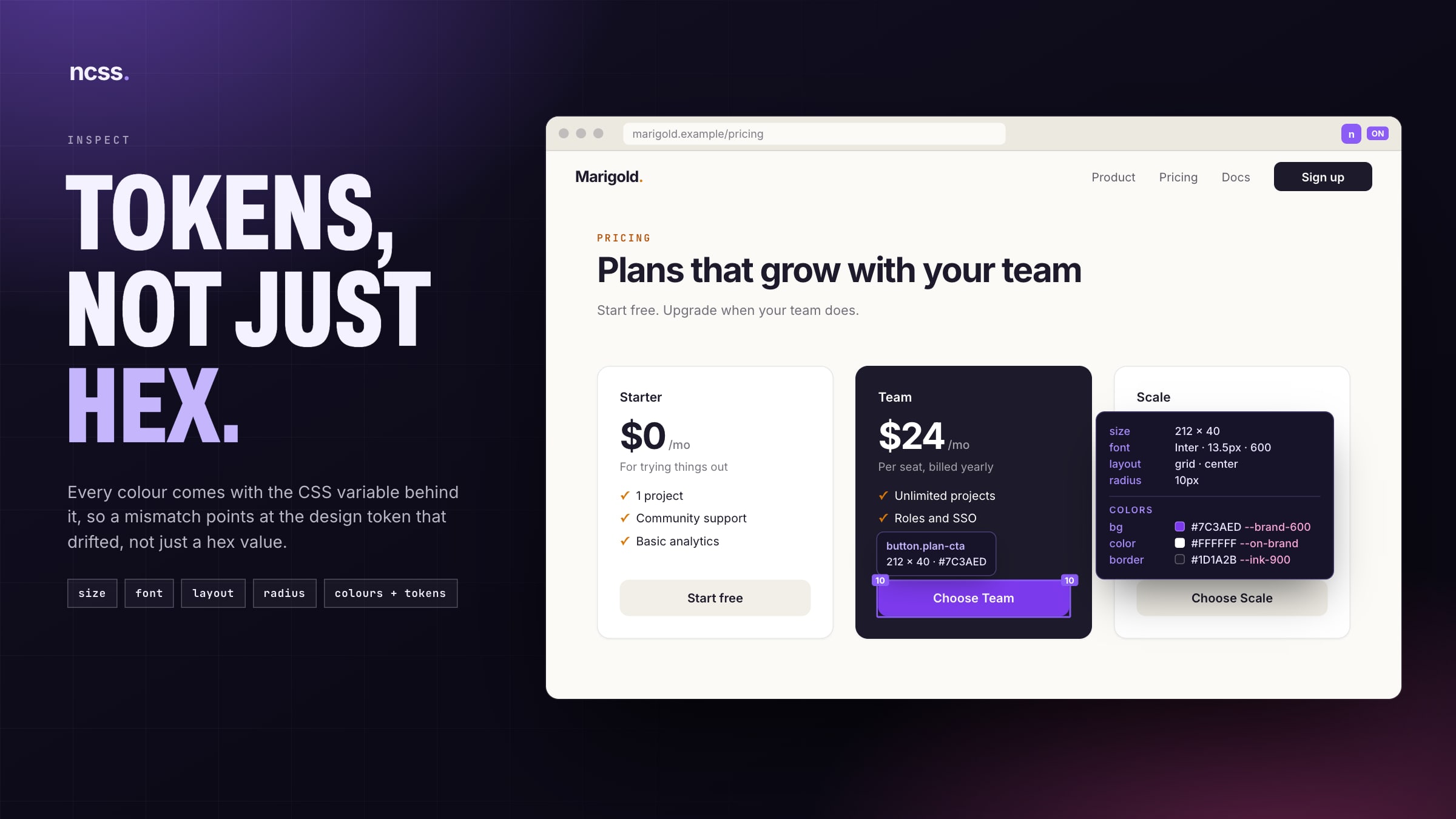
The browser’s computed style only ever returns the resolved colour. To find the token behind it, the extension walks the page’s stylesheets, recursing into @layer, @media and @supports, finds the rules that match the element and reads the var(--name) out of the declaration. Inline styles are checked first.
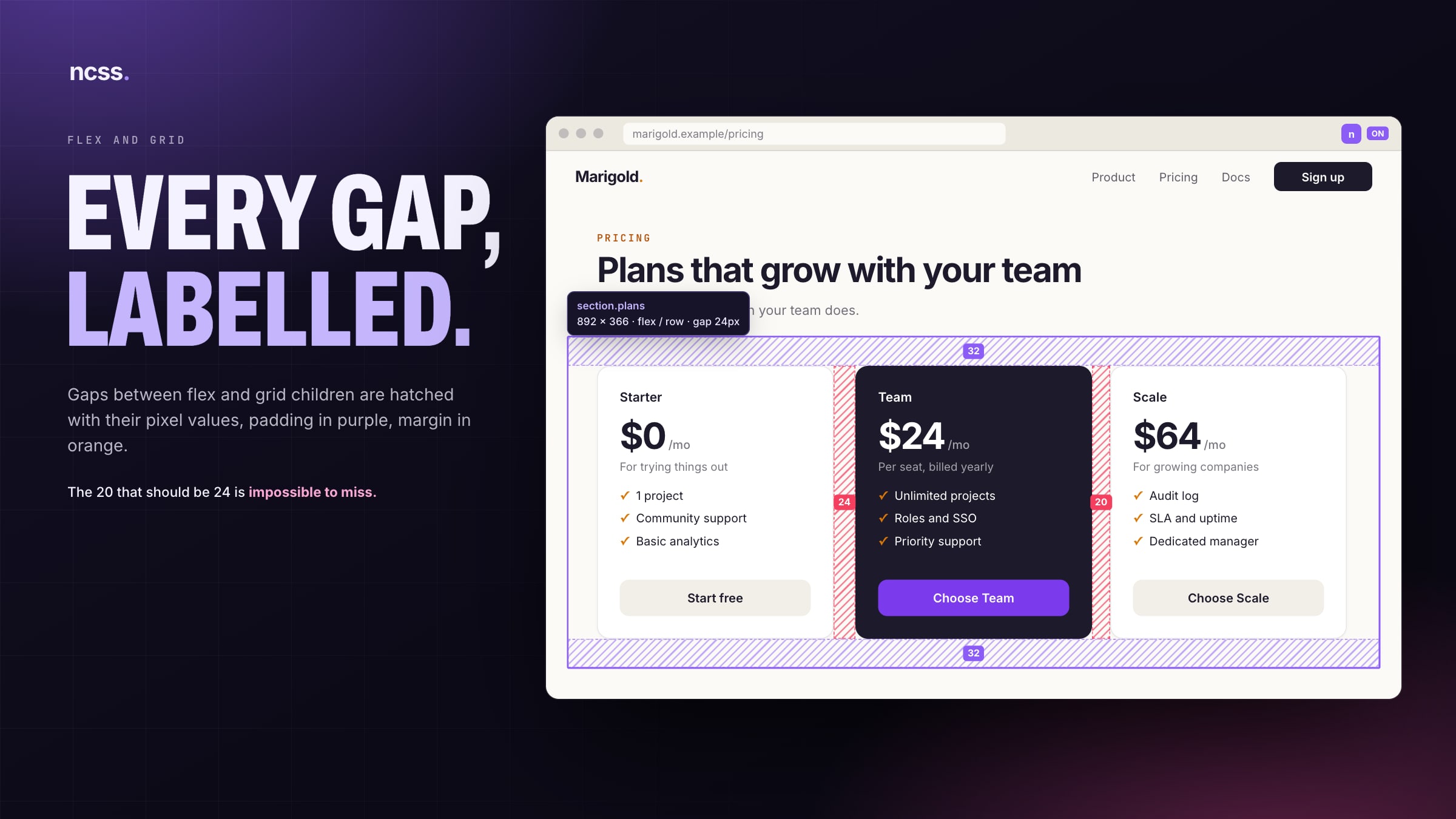
The same pass labels padding in purple, margin in orange and every flex or grid gap with its value, so a 20 that should be 24 stands out at a glance.
Trade‑offBrowsers block reading stylesheets served from another domain, so colours from that CSS show as hex only.
See the codecontent-script/geometry · searchRules
A matching rule’s declaration still holds the var() the author wrote, long after the computed value has resolved it away.
for (const rule of rules) {
  if (rule instanceof CSSStyleRule) {
    try {
      if (!el.matches(rule.selectorText)) continue;
    } catch {
      continue;
    }
    for (const prop of propsToCheck) {
      const v = extractVar(rule.style.getPropertyValue(prop));
      if (v) return v;
    }
  }
  if ("cssRules" in rule && (rule as CSSGroupingRule).cssRules) {
    const found = searchRules((rule as CSSGroupingRule).cssRules, el, propsToCheck);
    if (found) return found;
  }
}
:hover without hovering
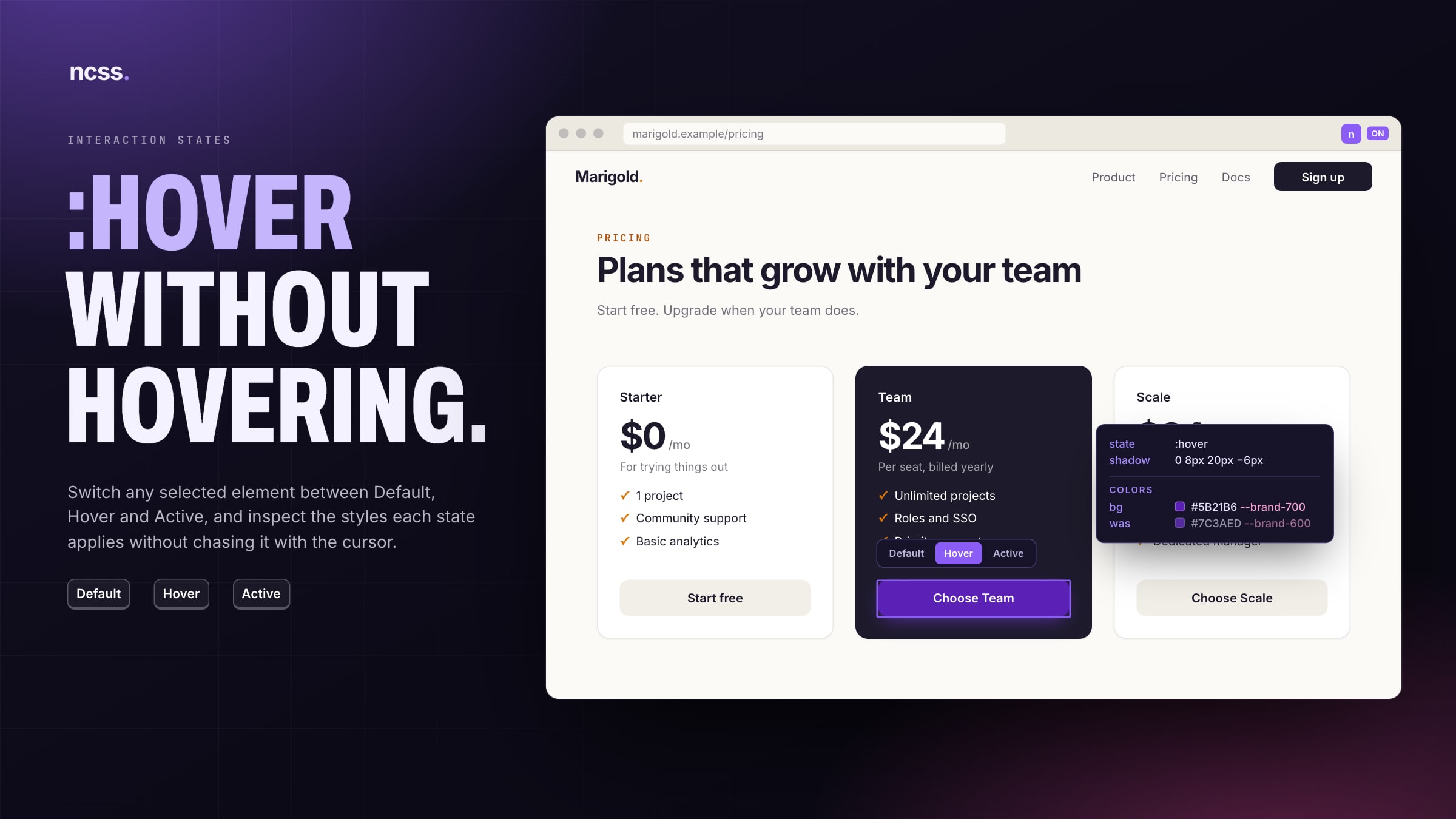
Interactive styles vanish the moment the cursor moves to inspect them. Naked CSS collects the :hover and :active rules that would match the selected element, applies them inline for an instant, reads the result and restores the original values.
Chrome’s DevTools protocol can force states properly, but an extension needs the debugger permission for that, and Chrome then shows a warning bar on the page. I took the lighter route.
Trade‑offIt’s a close approximation, not the browser’s own state: rules in unreadable stylesheets and hover effects driven by JavaScript aren’t included.
See the codecontent-script/geometry · withForcedState
Overrides are applied as inline !important styles, read, then put back exactly as they were.
const saved = new Map<string, string>();
for (const [prop, val] of overrides) {
  saved.set(prop, htmlEl.style.getPropertyValue(prop));
  htmlEl.style.setProperty(prop, val, "important");
}

const result = fn(el);

for (const [prop, orig] of saved) {
  if (orig) htmlEl.style.setProperty(prop, orig);
  else htmlEl.style.removeProperty(prop);
}
Inspect without touching
Everything is drawn in one SVG layer, fixed over the viewport with pointer events switched off, so the page keeps its own clicks and scrolling. Mouse moves are batched to one update per animation frame, so measuring never thrashes layout.
The panel’s Inter font ships inside the extension, so it looks the same on every site whatever CSS the page loads. It asks only for activeTab, scripting and storage, and analytics are anonymous feature events with no URLs and no page content.
Trade‑offEmbedding three font weights is more than half of the 175 KiB package. A panel that looks the same everywhere was worth it.
Built to be found
A Chrome extension lives or dies by search, so I researched the store listing like a landing page. The title leads with what people actually type: CSS inspector, pixel ruler, layout debugger.
An earlier title led with “CSS Debugger”, until a search audit showed four extensions literally named that holding the top results. I moved it into the description and aimed for queries I could win.
The landing site is Next.js on Vercel, with comparison pages against VisBug, CSS Peeper, Page Ruler and Inspect, an llms.txt for AI answers, and launch posts where the audience already is, starting with r/css.
Trade‑offRanking for winnable queries means not chasing the biggest search term.
What it became
A Manifest V3 extension built with Vite and TypeScript: a content script that does all the reading and drawing, a small service worker that keeps track of tabs, and nothing that ever leaves the browser except anonymous counts.
+ inject
Geometry, token lookup and state preview, drawn as one SVG overlay.
Chapters03040506Per‑tab on and off, injection into older tabs, analytics relay.
Chapters06only
Numbers mark the chapters behind each part. Point at one to see what it touches.
Where it landed
Naked CSS is live on the Chrome Web Store, free for anyone. Back to the three goals:
- ✓ Goal 1Two elements, one hover.Pixel distance, padding, margin and gaps are drawn on the page, with no panel to dock.
- ✓ Goal 2Tokens, not guesses.Colours come with the CSS variable behind them, so a mismatch names the token that drifted.
- ✓ Goal 3Read‑only and private.One overlay that never takes a click, three permissions and no page content sent anywhere.
Trade‑offs I live with
- Colours from cross‑origin stylesheets show as hex, without their token.
- The :hover and :active preview is an approximation of the browser’s own state.
- Chrome only, and pages Chrome protects, like the Web Store, can’t be inspected.
I built it alone, from the geometry to the growth plan, and it stays free.
Stop opening DevTools to check a 4px padding.
Free, no account, and no page content ever leaves your browser. Install it, open any page and press ⌘ I (Ctrl I on Windows).
- 01Add to ChromeOne click from the Chrome Web Store.
- 02Press ⌘ IOn any page. Hover anything to see its details.
- 03Click, then hoverLock one element and measure everything else against it.
Chrome and other Chromium browsers that install from the Chrome Web Store